Jobscan: In today’s job market, getting noticed by employers has become increasingly challenging. This is largely due to the use of Applicant Tracking Systems (ATS). These kind of systems are used by companies to streamline their hiring processes. What is an ATS?
What is ATS (Application Tracking System)?
ATS are software applications that automate the initial screening of resumes. It is used to filter out those that do not meet specific criteria before a human ever reviews them. With over 98% of Fortune 500 companies utilizing ATS, and many smaller firms following suit, a significant portion of job applications can get rejected without being seen by a recruiter.
These systems scan resumes for keywords, skills, and formatting, making it crucial for job seekers to tailor their resumes to match the job descriptions closely. For instance, check out this job description which has a set of keywords. These keyword are like the metadata of that job. ATS filter through resume by using these keywords. The resume should reflect at least 50% of these keywords.

What is Jobscan.co? How it works?
Jobscan offers a suite of tools to help job seekers optimize their resumes and LinkedIn profiles to increase their chances of getting noticed by recruiters. Moreover, it is an AI-powered platform specifically designed to help job seekers tailor their resumes and cover letters to match specific job listings.
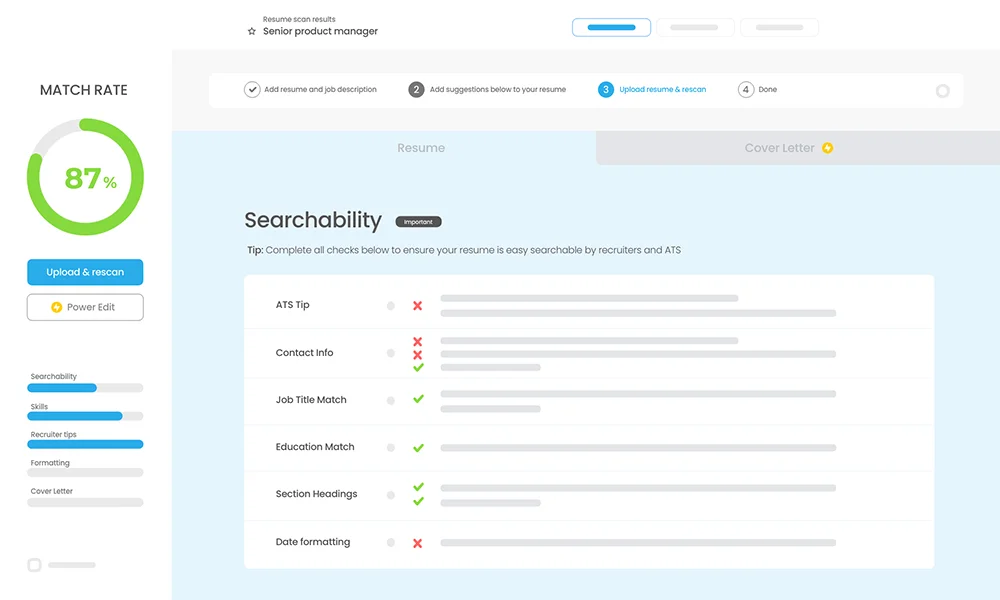
It works by analyzing your resume against job descriptions. Subsequently, Jobscan provides detailed feedback on how to improve your match rate, ensuring your application is seen by recruiters and gets past Applicant Tracking Systems (ATS). In other words, Jobscan gives you a way to screen yourself before reaching the companies, significantly enhancing your chances of landing that desired interview.

Features:
These are some of the prominent features of Jobscan
Resume Scanner
- Functionality: First, upload your resume and the job description to get a detailed match report. The scanner then checks for hard and soft skills, keywords, and formatting issues that may affect ATS readability
- Benefits: Consequently, this helps tailor your resume to specific job listings, thereby improving your chances of being noticed by recruiters.
LinkedIn Optimization:
- Functionality: Scan your LinkedIn profile to get tips on optimizing it for recruiter searches. Ensures your profile contains relevant keywords and information.
- Benefits: Enhances your LinkedIn visibility, making it easier for recruiters to find you
Resume Builder:
- Functionality: Firstly, create an ATS-friendly resume using customizable templates. As you fill in your details, the builder automatically formats your resume to meet ATS requirements.
- Benefits: Consequently, this process saves time and ensures your resume is formatted correctly for ATS, significantly increasing your chances of getting noticed by recruiters.
Job Tracker:
- Functionality: Firstly, keep track of your job applications, resumes, and interviews all in one place. Additionally, the Chrome extension allows you to save jobs directly from job boards.
- Benefits: Consequently, this tool streamlines your job search process, helping you stay organized and focused, thereby increasing your efficiency and chances of success.
How to Use Jobscan.co
- Upload Your Resume: Start by uploading your resume to the Jobscan dashboard.
- Input Job Description: Paste the job description into the scanner.
- Analyze and Optimize: Review the match report to see how well your resume aligns with the job requirements. Make the necessary adjustments based on the recommendations.
- Rescan and Refine: Continuously update and rescan your resume until you achieve a match rate of 75% or higher.